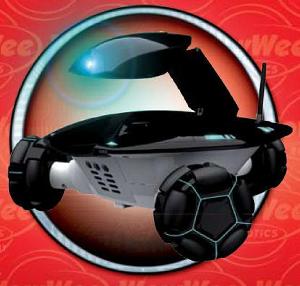
Editor’s comment: In these uncertain and risky times, the peace of mind that comes from being able to check on your home, loved ones or pets can be an invaluable commodity when you are away at work or on a business or holiday trip. Rovio can be your faithful watchdog, alerting you to danger without you having to risk life or limb by investigating that strange noise downstairs yourself; or allow you to make sure the house is secure from a remote location if you go home to find a door or window open that you know you left closed. Rovio can also help you find out what the dog or cat is doing to your furniture when you leave for work or check in and talk with the kids to make sure their homework is being done or just to get that warm feeling of knowing that they are ok. Also, check with your accountant as Rovio may be deductible as a home improvement expense.
NOTE: The WowWee Rovio can be can be configured using either a Windows PC or Apple Macintosh. See below for details.
Possibly the most exciting member of WowWee's 2008 new product line, the Rovio is a mobile robotic web camera with omnidirectional movement ability thanks to its unique tri-wheel design. The most exciting feature of Rovio is that it incorporates the incredible Northstar technology. Northstar is a system that is like having a micro-GPS system for your home, allowing the Rovio to navigate your home with pinpoint accuracy. With Northstar Rovio always knows exactly where it is and where you want it to go next.
The built-in web camera has full audio and video streaming capability so you can spy on your home from anywhere in the world you have a Web connection and uses the reliable 802.11b/g protocols for true WiFi access. Check in to see if you home is secure, or to get a comforting look at pets, or to dynamically web conference with family members or colleagues at work. Rovio's neck-mounted camera and microphone can be accessed over the web from cell phones, personal computers, or even some video game consoles (if they are web enabled). Use your personal computer to create navigation routes for Rovio by marking way points in your home with its easy to understand companion software. Simply mark a way point and Rovio will move to the desired location without any need for you to micromanage the navigation; just point and click! Since Rovio has self-docking capabilities, you can send it back to base for a recharge with a single touch of a web browser button.
[UPDATE] - Evolution Robotics, the wizards behind the Northstar navigation technology behind Rovio, has created some videos to show you just how easy it is to set up patrol routes with Rovio. Click here to watch these videos now.
Features
You can use simple “go-to” commands to assign easy to understand labels to important places in your home or office, then tell the robot to go there with a single click of your browser. You can do this remotely from anywhere you have a web connection or from a mobile phone. For example, “go to the kitchen”.
Rovio can patrol your house using predetermined routes you set up with easy-to-use software based on a simple point and click interface. Set up routes to make sure the the pets have been fed and are staying out of trouble, monitor potential entry points for intrusion, or check to see if certain appliances have been turned off or not.
With the help of its micro-GPS system, if a child or pet knocks the Rovio off course, it immediately rights itself and continues on its predetermined route; a big plus when you are remotely monitoring it and can’t be there to pick it up.
It can effortlessly find its charging station when its batteries start to run low, from anywhere in your home, and dock with the station with pinpoint accuracy.
Rovio can be ordered from the United Kingdom from super-retailer Red5. They have just slashed their price to £150 and according to them “Demand is extremely high on this product especially at this price”.
Rovio Pictures Gallery - Photos courtesy of WowWee Group Limited
Click on a photo to see it full size
Rovio Videos
WowWee has done an incredible job in creating teaser videos that show the Rovio and its features. Here are they are in increasing order of product detail.
Meet Rovio - TV commercial style clip , short and sweet
Get To Know Rovio - Details on the Rovio and charging dock
Experience Rovio - Solid details on the Rovio, it’s web interface, and what you need to use it
Excellent demonstration video that shows the pinpoint accuracy of Evolution Robotic’s Northstar technology, including a demo of how the easily the Rovio recovers from a disruption in its path.
High quality video which shows the new Rovio body and gives an excellent overview of its features and capabilities. Note: the other robot in the video is WowWee’s Robopanda who is only their for show and is not part of the Rovio package.
Benjanmin Chertoff from the Switched Show gives a good overview of the Rovio and its features. Nice close-ups of the sleek looking reconnaissance robot.
Part I of an in-depth look at the software and procedures required to create paths with Rovio.
Part II of an in-depth look at the software and procedures required to create paths with Rovio. Shows just how amazingly easy it is to set up patrol routes for your home.